
Quick Answer: Flutter app development is the practice of building cross-platform mobile applications using Google's Flutter SDK and Dart, where a single codebase runs on iOS android, web and increasingly desktop and embedded systems. To ensure professional execution, many organizations partner with a mobile app development company USA to leverage the mature widget system, the Impeller rendering engine, and an ecosystem rich enough that most users cannot tell Flutter apps from native code. Realistic cost lands between $40,000 for a focused MVP and over $250,000 for a polished cross-platform product.
Sit through a mobile build vendor pitch in 2026 and you can usually tell within the first ten minutes whether the engineers on the other side of the table have actually shipped a Flutter app to a real user base or just read the documentation last weekend. The tell is whether they say "Skia" or "Impeller" when the rendering engine comes up:- The second answer means they have shipped something on Flutter in the last eighteen months, the first means they are quoting from a 2022 architecture review.
A founder I work with sent me a Slack message at 11:14 PM last March asking, in the slightly desperate tone reserved for procurement decisions, whether Flutter was "actually fine" or whether her engineering lead was steering her toward a framework she would regret in eighteen months. The honest answer required walking her through how the conversation went around.
Flutter app development has shifted three times since the 1.0 release in December 2018 and the framework's lead recommendation is meaningfully different from the one most procurement committees remember. What follows is the version of that conversation — the kind an experienced builder would have with a CTO over coffee while following a standard mobile app development process to account for long-term scalability and maintenance.
By the end you will know what real builds cost, when Flutter cleanly wins and the legitimate edge cases where it still loses to native or React Native.
What Is Flutter App Development and Why It Looks Different in 2026
If you have been searching for what Is Flutter App Development and walked away more confused than when you started, you are running into the residue of a category that has shifted three times since 2018. Flutter app development is the practice of building applications using Google's Flutter SDK and Dart, serving as a leading choice for hybrid app development where a single codebase compiles to genuine native binaries running on iOS android, web, desktop and even embedded automotive systems.
Flutter app development is the practice of building applications using Google's Flutter SDK and Dart, where a single codebase compiles to native binaries running on iOS android, web, desktop and (since the Toyota infotainment partnership announced in 2023) embedded automotive systems. The framework ships its own rendering engine, which explains both Flutter's strengths and its narrowest remaining weaknesses.
Here is what defines Flutter app development in 2026:
A single Dart codebase compiles to genuine native binaries on iOS and Android, not web views or JavaScript bridges as critics still claim.
The Impeller rendering engine that replaced Skia across 2024 draws every pixel directly, delivering visual consistency native frameworks structurally cannot match.
The widget system makes UI composition expressive enough that senior engineers look forward to opening the codebase, the kind of relationship most cross-platform frameworks never earn.
What Is Flutter App Development in One Honest Sentence
What is Flutter app development at its simplest is the practice of writing one mobile codebase that runs across iOS android, web and desktop using Google's Flutter framework and Dart. That single decision reshapes your hiring math, your cost model and the maintenance burden your team carries.
Why Flutter Looks Different in 2026 Than in 2020
Flutter looks different in 2026 because the framework shipped its long-promised production quality around the Flutter 3.0 release at Google I/O 2022, while the ecosystem and hiring market caught up over the following eighteen months. The Flutter you evaluated alongside React Native in 2020 is not the Flutter shipping today and that distinction is where most inherited procurement skepticism still comes from.
How Flutter Differs From Native Development
Flutter differs from native because the codebase is shared across iOS and Android rather than duplicated and the rendering pipeline draws every pixel directly rather than calling out to UIKit for each widget. This approach allows brands to realize the strategic mobile app development benefits of shipping faster without compromising on UI fidelity or user experience across fragmented device types.
Why Major Brands Quietly Ship Apps Developed With Flutter
The list of companies shipping apps developed with Flutter in 2026 has grown long enough that the framework's enterprise credibility stopped being up for debate inside serious engineering rooms around the eBay Motors launch in 2022. The pattern of brand adoption looks different from the early years when most CTOs treated Flutter as a curiosity.
BMW ships their flagship iX and i7 driver companion app on Flutter, Alibaba runs Xianyu (their secondhand marketplace with over 200 million users) on it, Google Pay was rebuilt on Flutter across 2020 through 2022 and eBay Motors uses Flutter for the full marketplace including the auction interface. These are flagship apps carrying serious revenue weight across millions of daily users worldwide.
Here is what the enterprise adoption pattern reveals about Flutter app development:
Major brands trust Flutter with critical production workloads because the rendering quality and ecosystem cleared their internal architecture review bars.
The apps developed using Flutter at scale show the framework handles real complexity beyond demo interfaces or simple form-based apps.
Enterprise procurement picks Flutter when they want consistent visual quality across platforms without maintaining parallel iOS and Android teams.
What BMW, Alibaba and Google Pay Share in Their Flutter Bets
What these three share is a hard commitment to consistent visual quality across iOS and Android without the overhead of dual native teams. They could have fully native if they wanted to and the fact that they picked Flutter signals real confidence in production readiness at scale.
Why eBay Motors and Toyota Trust Flutter With Revenue Apps
eBay Motors and Toyota trust Flutter with revenue apps because the framework delivers the performance and reliability their users expect. Toyota's bet is especially interesting because embedded automotive forces Flutter to handle resource constraints consumer apps never encounter and it has held up across the 2024 rollouts I have followed.
How Brand Adoption Shifts Procurement Conversations
Brand adoption shifts procurement conversations because skeptical CTOs and CFOs reference industry usage when making framework decisions. Citing apps developed using Flutter at companies the board recognises that closes the credibility gap pure technical arguments cannot bridge.
Is Flutter Good for App Development: The Honest 2026 Assessment
If you have searched for "is Flutter good for app development" and walked away with conflicting opinions from Reddit, you are encountering the residue of a category that changed faster than the consensus. When compared to other mobile app development frameworks, Flutter is good for most mainstream mobile product shapes and the cases where it loses to native have narrowed since 2022 in ways founders rarely hear.
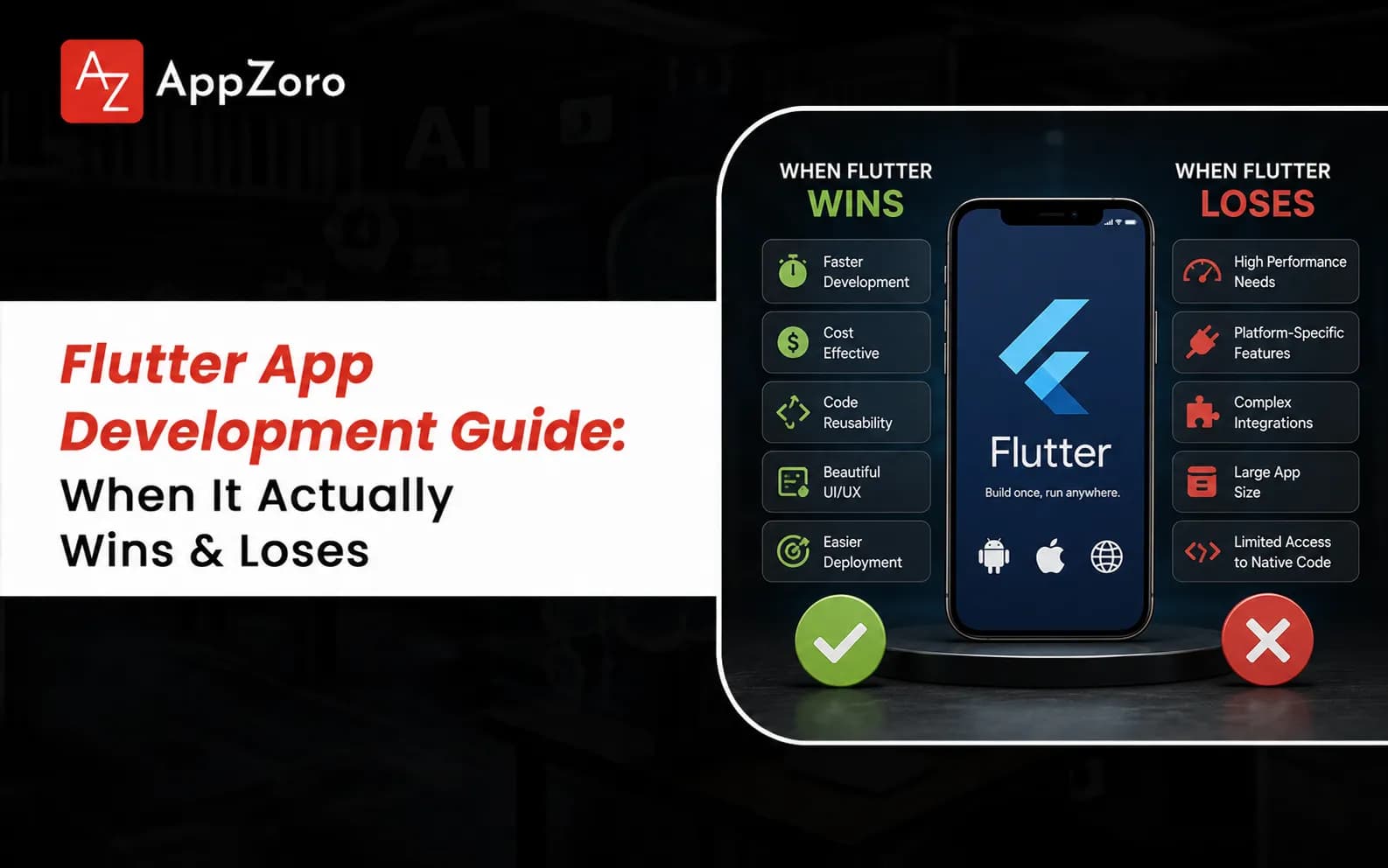
Flutter is good for app development across most mainstream mobile product shapes and the cases where it loses to native have narrowed since 2022 in ways founders rarely hear during vendor pitches. Here is where Flutter wins and loses in 2026:
Flutter wins across most consumer mobile apps where consistent visual quality, fast iteration and cross-platform parity matter more than platform-specific tooling.
Flutter wins for enterprise apps where the engineering team size needs to stay small while still shipping serious functionality across both iOS and Android.
Flutter loses to native for products requiring tight integration with platform-specific sensors, advanced AR using ARKit and ARCore or wearable apps the ecosystem still handles awkwardly.
When Flutter Wins the Build
Flutter wins the build when your product needs consistent visual quality across platforms, when your engineering team values the Dart developer experience and when your hiring market includes Flutter-fluent talent at reasonable rates. Those three conditions describe a meaningful share of new mobile builds in 2026.
Where Flutter Still Loses Meaningfully
Flutter still loses for products depending on advanced wearable integration (Apple Watch and Wear OS specifically), intensive AR using ARKit and ARCore or tight platform-specific sensor access where the Flutter plugin ecosystem trails Swift and Kotlin SDKs by six to twelve months. Knowing whether your product sits in those categories before kickoff prevents the migration I have watched several teams attempt.
Why the Honest Answer Is Usually Yes
The honest answer to whether Flutter is good for app development is usually yes for new builds in 2026 because the maturity threshold is behind us and the ecosystem supports nearly every production need. Remaining exceptions are real but narrow and identifying them during discovery is straightforward when your team knows what to look for.
The Benefits of Flutter App Development That Compound Across Years
The benefits of Flutter app development compound across years in ways most founders underestimate during initial framework selection. The shared codebase compounds across years because every feature works on both platforms the moment it ships, leading to a more efficient mobile app development cost breakdown compared to native teams who need roughly twice the capacity to maintain parallel apps.
Engineering teams shipping on Flutter report higher productivity than teams maintaining parallel native codebases and that advantage compounds quarter over quarter. Here are the benefits worth knowing alongside the trade-offs:
The shared codebase saves roughly thirty to forty percent of native cost while letting smaller teams ship more product across the same timeline.
Consistent visual identity across iOS and Android helps brand teams who want the app to look identical regardless of device.
The expressive widget system and hot reload deliver a developer experience that compounds across years of feature shipping.
Why the Shared Codebase Compounds Across Years
The shared codebase compounds across years because every feature works on both platforms the moment a Flutter engineer ships it, while native teams shipping the same surface need roughly twice the capacity. That gap is what I have watched lean Flutter teams use to outship larger native organisations at three different startups since 2023.
How Developer Experience Translates Into Faster Shipping
Developer experience translates into faster shipping because engineers who enjoy the codebase ship more features per quarter than engineers fighting their framework. Flutter's hot reload (meaningfully faster than React Native's Fast Refresh in my experience), the expressive widget system and Dart language design create conditions where senior engineers move fast.
Why Consistent Visual Quality Matters More Than Founders Expect
Consistent visual quality matters more than founders expect because the user experience feels more polished when the app looks identical on every device. Open Wonderous (Flutter's showcase) or the eBay Motors marketplace on both an iPhone and a Pixel side by side and you will see exactly what design teams mean when they push for pixel-perfect parity.
Flutter Cross-Platform App Development Versus React Native and Native
The Flutter cross-platform app development conversation usually gets framed as a binary choice between Flutter and React Native, when the real procurement decision involves your specific tech stack for mobile app development, including back-end integrations and security. Both are mature in 2026 and the right call depends heavily on your team's existing expertise and the specific product needs you are solving.
Flutter and React Native are both mature in 2026 and the right call depends heavily on your team's existing expertise, your hiring market and the specific product needs you are solving for. Here is how the trade-off breaks down:
Flutter cross platform app development wins for teams who want consistent visual quality, smaller engineering footprint and the Dart developer experience engineers rate higher than JavaScript.
React Native wins for teams with deep JavaScript expertise, easier hiring across the React ecosystem and the broader npm integration library developers reach for instinctively.
Native still wins when your product requires tight platform integration with sensors, wearables, AR or platform-only tooling cross-platform handles less elegantly.
When Flutter Beats React Native
Flutter beats React Native when your product needs consistent visual quality across both platforms, when your design team wants pixel-perfect parity and when your engineering culture values strong typing and the Dart ecosystem over the looser JavaScript world. These conditions describe a meaningful share of serious new mobile builds today.
When React Native Still Wins Procurement
React Native still wins procurement when your team has deep JavaScript expertise, when your hiring market favours React engineers and when your product needs the broad ecosystem integration React Native's npm dependency tree provides. I have watched several strong teams ship excellent products on it across the past two years.
When Going Native Still Defends Its Higher Cost
Going native still defends its higher cost when your product depends on advanced platform-specific features, when you have engineering depth to maintain parallel teams and when your customers demand platform-native experiences. Strava, Apple Fitness and similar performance-critical products ship native for defensible reasons.
Real Flutter App Development Cost and Process in 2026
Most founders ask about Flutter app development cost as if there is one clean number but the realistic answer depends heavily on whether you are building a focused MVP or a polished cross-platform product with serious integration depth. The build cost is roughly thirty to forty percent of the real three-year spend across most projects that survive past their first year.
The rest shows up as cloud infrastructure, third-party API fees, app store cuts, support staffing and the maintenance budget every founder underestimates during initial pitch deck preparation.
Here is how realistic cost breaks down:
A focused Flutter MVP with three to five core features lands between $40,000 and $80,000 for a clean build with reasonable polish.
A full Flutter product with rich features and integrations across both platforms lands between $80,000 and $180,000 depending on scope.
A premium Flutter product with native modules, video, AI features or deep backend integration lands between $150,000 and $250,000.
Why a Focused Flutter MVP Costs Less Than You Expect
A focused build costs less because the shared codebase means one engineer can ship for both platforms. Always check a detailed Flutter app development cost estimate to ensure you are getting the efficiency benefits of the framework rather than paying a native-tier premium.
Hidden Costs That Trip Up First-Time Flutter Builds
Hidden costs tend to be native modules required for specific features (anything touching wearables, advanced camera APIs or background location especially), the platform-specific polish nobody scopes during discovery and the maintenance burden as iOS and Android keep updating. Budget realistically upfront rather than discovering them halfway through launch.
Year-One Maintenance Reality Senior Teams Plan For
Year one covers bug fixes, security patches, Flutter framework upgrades (Google ships major updates twice a year), OS compatibility work and small feature work from real user feedback. Budget honestly from kickoff or pay double during the year your runway can least afford the surprise.
What Senior Teams Quietly Get Right About Flutter Mobile App Development
The strongest teams I have watched ship Flutter mobile app development share a small set of disciplines that compound across years of operation. They are winning because they understand the nuances of choosing a mobile app development company that treats Flutter as a real architectural commitment rather than a default choice to save money on the build.
Here is what the senior teams I respect do differently when they ship Flutter mobile app development:
They invest seriously in Dart engineering hiring during discovery because Flutter rewards strong typing and architectural patterns from the first sprint
They protect performance budgets ruthlessly because apps perceived as slow lose users in the first thirty seconds
They embrace platform-specific polish (Cupertino widgets on iOS, Material 3 on Android) rather than fighting the conventions users expect
Why Hiring Senior Dart Engineers Compounds Across Years
Hiring senior Dart engineers compounds because Flutter rewards strong typing and architectural patterns from week one. Teams staffing Flutter projects with engineers who understand the framework ship better products than teams staffing them with JavaScript engineers learning Dart on the job- a pattern I have watched play out across at least four teams since 2023.
How Performance Discipline Decides User Love
Performance discipline decides user love because Flutter apps that feel sluggish lose users within thirty seconds of opening and that perception is hard to recover. Treating cold start, navigation responsiveness and animation smoothness as first-class concerns from the first sprint is what separates great Flutter apps from forgettable ones users delete by Tuesday.
Why Platform-Specific Polish Earns Real User Love
Platform-specific polish earns real user love because users notice when an app feels native to their platform. Respecting iOS conventions (Cupertino navigation, the right back gesture, system fonts) and Android conventions (Material 3 patterns, the system share sheet) separates a Flutter app users love from one they tolerate.
If you are weighing your next mobile build and want a no-pitch second opinion on a Flutter proposal sitting on your desk, our senior team reviews these for founders almost every week. Happy to flag anything underscoped before you sign the contract.
Final Thoughts
Flutter app development in 2026 is a more credible default than it has ever been and the playbook for shipping something users love is more legible than three years ago. The teams that win pick Flutter for the right reasons, scope platform-specific polish honestly into the build and treat the shared codebase as the long-term advantage it actually is.
If the proposals on your desk feel impossible to compare, get a third opinion from someone who has actually shipped Flutter products at scale. The right partner walks you through the challenges of mobile app development and the framework trade-offs without flinching, because they have lived inside the build cycle long enough to know where it breaks.
Leave a Comment