
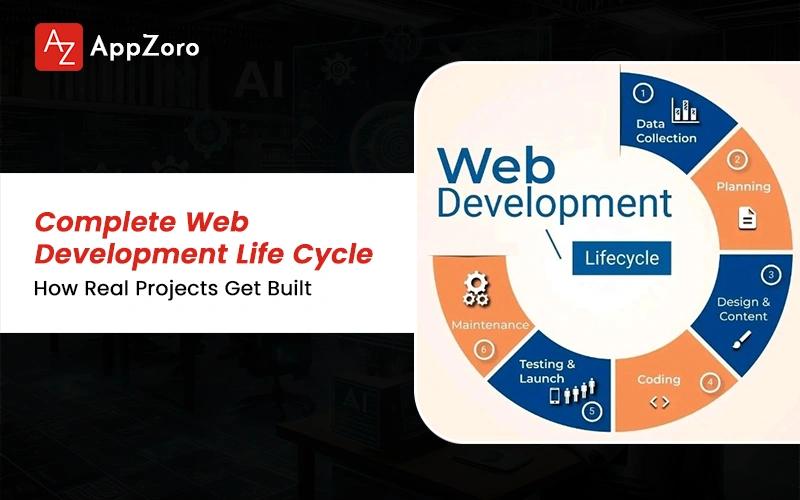
Quick Answer: The web development life cycle is the structured process a team uses to plan, design, build, launch and maintain a web product across its full lifespan. It covers seven phases: discovery and requirements, planning and architecture, UX and UI design, content and information architecture, development, testing and quality assurance and deployment with ongoing maintenance. Modern teams run these phases iteratively, weaving agile workflows, CI/CD pipelines and AI tooling into how each phase happens.
Imagine a random Friday afternoon, two weeks before launch and the project is finally showing what it has been hiding for weeks. The founder is on Zoom asking when QA will sign off, while the designer is reworking a flow the engineers already built twice.
Each person on that team has been carrying a slightly different version of the project in their head for six straight weeks.
This is what the web development life cycle looks like the moment it stops holding the team together. What follows is a working translation of how the life cycle of web development truly runs inside real teams in 2026. By the end, you will know the language to use with your people and a clear view of where projects quietly fall apart.
Why This Process Still Matters in 2026
If you have spent more than three years in this industry, you have earned the right to roll your eyes at "process talk." You have probably watched a project unravel despite a clean arrow diagram drawn at kickoff and that scepticism is fair.
Skipping the cycle does not make a team move faster across the build. It just hides the process the team is already running, badly, inside Slack channels and rushed last-minute decisions.
A healthy web development life cycle in 2026 still does a handful of important things regardless of methodology:
It forces an early conversation about what success on this project should look like in real measurable numbers.
It surfaces constraints around budget, hiring, calendar and scope before they quietly become painful surprises later.
It builds short feedback loops that catch small mistakes before they compound into expensive rewrites and tickets.
What Most Teams Mean When They Say "We Have a Process"
They usually mean they have a Notion document nobody on the team has actually opened in four months on the wiki. The real process inside any healthy team lives in the rituals they protect daily, not in documents decorating the wiki for visitors.
Three Things Every Healthy Cycle Still Does Well
A healthy cycle creates honest alignment between the people building, paying for and eventually using the product across years. It surfaces real project risk early enough that the team can still do something about it before launch arrives at the door.
Why This Process Becomes More Important the Faster You Move
Speed has a way of amplifying every mistake your team makes during the build, rather than hiding them under raw velocity charts. Process is the only thing keeping real velocity from turning into expensive churn six months later in the project life.
What Is Web Development Life Cycle and How Does It Actually Work?
If you have ever Googled "what is web development life cycle" hoping for a clean answer, you already know how messy the explanations get. It is the structured process a team uses to take a web product from a vague idea through to launch and ongoing maintenance.
Real projects loop, double back and skip whole phases under deadline pressure that diagrams politely hide. The web development project life cycle is less of a straight road and more of a spiral that keeps returning to earlier phases as conditions change.
Here is the definition that genuinely holds up once real projects start putting weight on it:
A structured method to plan, design, build, test, launch and maintain a web product across its full lifespan.
It moves through phases that overlap, loop back and sometimes run in parallel under real conditions.
Not a Gantt chart, not a project management methodology and not a ceremony that ends on launch day itself.
The One-Sentence Definition That Truly Holds Up
The cycle is the structured, iterative process a team uses to carry a web product from a vague idea through to a maintained system in production. The tidy definitions you usually read tend to collapse when they meet a real client and a real deadline together.
What the Cycle Is Definitely Not in Practice
It is not a Gantt chart, not a marketing template and not a project management methodology dressed up in slightly different language for sales. It is a recurring structure that expands or compresses depending on the project shape and the people running it together.
Why Startups, Agencies and Enterprises Run It Differently
Startups compress nearly every phase because they are racing against their own runway and limited customer attention spans every quarter. Enterprises stretch every phase because the cost of being wrong about something visible is much higher inside their regulated world.
Phase 1: Discovery and Requirements: The Phase That Decides Everything Else
The brief you walked into the kickoff carrying is rarely the brief you actually needed for the project in front of you. Discovery is how your team finds that out before development starts, not after launch when fixing it gets expensive.
Three founders once walked into a kickoff certain about what they wanted built but two weeks of proper discovery later their feature list had shrunk by forty percent.
Here is what proper discovery should actually produce when your team takes the phase seriously:
A clear problem statement written in language a stakeholder outside the project would actually understand on first read
Validated user research, not internal assumptions wearing the vocabulary of research to feel more credible in meetings
Success metrics named in real numbers and dates, not soft adjectives like "fast" or "modern" or "user-friendly"
What Real Discovery Actually Produces
Real discovery produces deliverables your team can point at, not just vibes left over from a few cheerful workshops together. If your discovery ends with a Figma board and nothing else attached, the discovery did not really happen properly across the team.
The Cost of Shallow Discovery, Calculated Honestly
A skipped two-week discovery typically costs your team between four and twelve weeks of rework later on in the build. That rework gets spread painfully across design, development and QA, where it shows up looking like ordinary bugs nobody can explain.
Questions Every Project Should Answer Before Phase 2
Who is this product genuinely for and what specific problem does it solve in their working day right now? What is the smallest version of the product that would prove the idea is worth building further and what constraints are completely non-negotiable for this project today?
Phase 2: Planning and Architecture: Where Smart Projects Earn Their Speed
Architecture is the quietest phase, which is exactly why bad architecture becomes so loud later in the build cycle. A four-engineer team I watched once locked in their database choice over lunch without much real debate and eleven months later they spent an entire quarter migrating away from that decision in production.
Speed is not really the opposite of planning in any meaningful way; bad planning is the actual opposite of speed. Planning splits into two parallel tracks during this phase and both need real calendar time to do well:
Technical planning covers stack selection, architecture diagrams, the data model, API contracts, integration maps and security models
Project planning covers the sprint plan, milestone dates, dependency maps, the risk register and clear escalation paths
Decisions reversible expensively include database choice, authentication, multi-tenancy approach and the core data schema
Technical Architecture: The Decisions You Cannot Reverse Cheaply
Database, authentication, data model, tenancy and primary language are the architectural choices that cost the most to undo later in the project. Senior architects know to slow down here precisely because they have already paid the price of moving too fast before across multiple builds they wish they could redo from scratch.
Project Planning: Sprints, Milestones and Realistic Timelines
Real project timelines have buffer baked into them, because real projects always uncover surprises during the build that nobody predicted. Milestones tie cleanly to outcomes the business actually cares about, rather than to internal activities that simply look like progress to leadership reading the dashboard.
Why Named Risks Are the Risks You Will Not Face Later
A named risk during planning becomes a managed risk that the team can mitigate, plan around or openly accept in advance. The unnamed risk is the one that quietly takes the project down at the worst possible moment, which is why senior teams keep their risk registers brutally honest.
Phase 3: UX and UI Design: Designing for Decisions, Not Just Beauty
The best designers in this phase are the ones who make engineers say "this is going to be easier than I thought." Good design is not decoration sitting on top of a product and a SaaS team I worked with once spent four full weeks polishing their main dashboard before launch only to discover the first ten users could not find the primary action button during testing.
A healthy design phase produces specific deliverables in a specific order across the build:
User flows that map decision points across the product clearly, not just attractive collections of screens
Wireframes that confirm the underlying logic of every flow before any visual styling or polish gets applied
Clickable prototypes that real users can navigate through and react to before development work begins in earnest
UX First, UI Second and Why That Order Matters
UX defines what the user is supposed to do inside the product and equally importantly, why they should care to do it consistently. Reversing this order is how teams end up shipping beautiful interfaces that nobody can quite figure out how to use, because every design decision ripples through every later phase of the web development life cycle.
The Deliverables That Save Development Time Later
Prototypes, design systems and clean handoff documentation are the three deliverables that consistently save the most development time across the build. Every hour invested here saves roughly three hours during development and five hours during QA work later and that ratio holds up consistently across project sizes I have worked on for years.
When Design Becomes a Bottleneck and How to Spot It
Design becomes a bottleneck the moment it tries to solve product problems instead of staying focused on real design problems specifically. If your designer is being asked to decide what the product should ultimately do, the project is missing a product owner rather than a designer.
Phase 4: Content and Information Architecture: The Phase Most Teams Skip and Regret
If you have ever shipped a product with lorem ipsum still sitting in production, you have already met the cost of skipping this phase. Content and information architecture is the most under-resourced step in the entire process today and most teams discover this during launch week when the marketing lead casually asks who is writing the empty-state copy.
A proper content phase should produce the following deliverables before launch:
A sitemap that reflects real user journeys through the product, not the company's internal team structures
A content model defining what types of content exist inside the product and how those types relate
Microcopy for buttons, form labels, validation messages, tooltips and the small text between user actions
Content as a Phase, Not an Afterthought
Name this phase explicitly inside your project plan and resource it with the same seriousness that design or development gets at kickoff. Otherwise it becomes the bottleneck nobody planned for during the final week before launch actually happens and give it a real owner with a real deadline attached.
The Hidden Content That Always Holds Up Launches
The content that consistently holds up launches is microcopy, error messages, empty states and transactional emails sent to users every day. These are also the pieces of writing real users spend the most time reading inside the live product, even though nobody volunteers to own them at the start of the project.
Information Architecture Done Right Across the Build
Good information architecture means sitemaps that reflect how users actually navigate through the product on an ordinary day at work. It also means schema that helps humans and search engines understand what your product really offers, with taxonomies that scale gracefully as the catalogue grows.
Phase 5: Development: Where the Plan Meets the Pull Request
The build phase is where bad decisions from earlier phases finally come to die and usually they die expensively. It is also the longest, most visible and most misunderstood phase across most teams shipping software today.
An engineering team I followed once shipped weekly for six months without a single major incident, because their culture treated "I do not understand this yet" as a complete sentence inside code review without judgment.
A healthy development phase generally has the following shape and rhythm across the sprints:
Front-end and back-end work running in parallel against a properly agreed API contract written down in advance
Version control discipline with short-lived feature branches and pull requests that mean something during review
CI/CD pipelines running tests on every push and deploying to staging automatically on every successful merge
Front-End, Back-End and the Quiet Integration Layer
Front-end builds the surface users actually see and touch every time they open the product on their device daily. The integration layer between front-end and back-end is where most bugs quietly live, which is why senior teams treat it as a first-class concern rather than an afterthought.
Version Control, Code Review and CI/CD Discipline
Short branches, reviewed pull requests and automated tests on every push are not exciting practices in any meaningful way at all. All of it compounds quietly into the kind of shipping speed that competitors cannot easily explain or copy, even though none of it makes for good conference talks.
How Non-Engineers Should Read a Development Sprint
Ask your team what shipped this sprint, what did not ship as planned and what changed about the broader plan recently. If the answers come back specific and confident from your engineers you are usually in good shape but if they come back vague the phase is in trouble underneath.
Phase 6: Testing and Quality Assurance: The Phase That Quietly Saves Your Launch
Every launch failure I have attended has the same sentence inside the post-mortem afterward, where someone always says "we thought we had tested for that exact case" with quiet disbelief in their voice.
Picture a Friday where QA signs off cleanly and everyone goes home, then payments fail the moment real users hit production because sandbox credentials were still active in one environment.
A comprehensive QA phase covers more ground than most teams realise from outside:
Unit and integration tests that confirm components work alone and together when wired into one another properly
End-to-end tests that walk through real user flows in a real browser, the way an actual user would experience them
Security tests covering the common vulnerabilities, with the OWASP Top Ten as an absolute baseline minimum
The Test Types That Truly Earn Their Place
Unit, integration, end-to-end, regression, performance, accessibility, security and UAT each earn their place inside a serious build that matters. You should weight them by risk profile rather than by personal preference and none of them should be skipped entirely from any project shipping to real users.
How AI Tooling Is Changing QA Without Replacing It
AI tools now generate test cases, catch visual regressions and surface anomalies inside production logs in genuinely useful ways. Senior testers still own the judgment calls that decide what is actually worth testing, so the shift has not removed humans from QA; it has changed what they spend time doing.
When QA Gets Compressed and How to Push Back
The phrase "we will handle it post-launch" is essentially a budget request dressed up as a methodology choice during planning meetings. The two things you should never compromise on under timeline pressure are security testing and accessibility testing and you should push back with the real cost of post-launch fixes.
Phase 7: Deployment, Launch and Post-Launch Maintenance: Because "Live" Is Not the Finish Line
Launch day itself is the easy part and most teams do not believe me until they have lived through it. Senior teams treat deployment as the start of the maintenance cycle, which usually costs more than the original build phase ever did.
A SaaS founder I worked with once budgeted six months to build and zero months to maintain and by month nine they were spending more on bug fixes and infrastructure than the original build had cost the company.
Deployment, launch and maintenance each work as distinct disciplines your team needs to plan separately:
Deployment covers staging environments that mirror production, canary strategies, feature flags and rehearsed rollback plans
Launch readiness includes monitoring dashboards, alerting thresholds, an on-call rotation, support runbooks and a communication plan
Year-one maintenance typically costs fifteen to twenty-five percent of original build cost annually, more if shortcuts were taken
Deployment Done Right with Staging, Canaries and Feature Flags
Staging environments that mirror real production conditions are the baseline expectation, not a luxury you can skip during planning meetings. Feature flags let your team ship code into production without committing fully to turning the feature on and canary releases catch problems before they reach everyone on launch day.
The Launch Checklist Most Teams Underestimate
Monitoring, alerting, the rollback plan, support readiness, communication plan and on-call schedule all live inside the launch checklist. Missing any one of them is reliably how routine launches turn into ugly post-mortems within forty-eight hours of going live for real users.
Year One: What Maintenance Truly Looks Like
Year one of maintenance covers bug fixes, security patches, dependency upgrades, performance tuning, small feature work and infrastructure scaling across the team. The teams who plan for year one from the very start are the same teams who still feel calm by month nine of operation.
The Web Development Life Cycle Diagram ( How to Actually Use One)
Most diagrams quietly lie about how projects actually move through the phases in real life. They show a straight line, when the actual shape of any real project is closer to a spiral with feedback loops everywhere.
A useful web development life cycle diagram earns its place by showing what teams actually live through, not what planners hoped would happen. A diagram earns its place when it includes a few specific things worth checking:
Loops rather than only forward arrows, showing how testing feeds back into development and launch feeds discovery
Parallel tracks where content, QA and infrastructure work happen alongside the main phases rather than purely sequentially
A visible post-launch loop, because most diagrams stop at deployment and pretend the cycle ends there politely
The Classic Linear Diagram and Why It Does Not Survive Reality
Linear diagrams imply each phase finishes cleanly before the next one quietly starts somewhere downstream of it on the page. The linear version is a useful introduction for newcomers but not a working tool for shipping teams under pressure, because real projects overlap and loop back constantly.
The Iterative Loop Diagram That Senior Teams Actually Use
Iterative diagrams show real feedback loops between testing and development, launch and discovery and maintenance and planning across the lifecycle. Senior teams sketch this shape on whiteboards because it matches what they live through and it is truly the shape projects move in once they meet reality.
How to Read a Diagram Without Getting Misled
A diagram is a thinking aid for your team, never a contract with the universe about how the project will actually run. If you treat it as a shared shorthand instead of a gospel, it will help your team align faster on what is happening underneath.
How AI, Agile and DevOps Have Quietly Rewritten the Life Cycle
The life cycle of web development did not get killed by AI in any meaningful sense, despite what some louder voices keep claiming online. It got renovated, room by room, while most of the structure stayed exactly where it always was supposed to be.
A team of four engineers I followed shipped at the pace of eight engineers across nine months last year, because code review became the highest-value ninety minutes of their day instead of the lowest. Here is how the three major shifts are playing out across the cycle right now:
AI in development through Copilot, Cursor and Claude Code doubles individual velocity on routine work and demands sharper review
AI in QA generates test cases, discovers regressions across browsers and runs visual diffs that move the needle
Agile turns the cycle into a continuous loop where sprints, retros and shipping cadence become the team's heartbeat
How AI Compresses Each Phase Without Skipping Any
AI accelerates research, scaffolds architecture diagrams, generates code, drafts content and writes tests across the whole cycle today. None of the phases actually get skipped, provided the team stays honest about what AI did and did not really do during the build week.
Agile and the Continuous Loop Running Through Sprints
Agile turns the cycle into a loop instead of a single sequence running from start to finish only once at kickoff meetings. That cadence is what keeps modern teams from drifting too far before someone catches the drift and corrects course back to the original direction.
DevOps and CI/CD When Phases Become Daily Habits
DevOps blurs the line between development, testing and deployment until they barely look like separate phases anymore on the calendar. The cycle slowly stops being a series of events and starts being more of a steady rhythm the team lives inside every day at work.
Web App Development Life Cycle vs Web Application Development Life Cycle vs Website
If you are building a SaaS product on a website-shaped timeline, you have already quietly lost before you started. The web app development life cycle skeleton stays the same across project types but the weights on each phase are radically different across categories.
A founder once asked our team for "a website with a login" and the final estimate came back at six times what they expected, because the team scoped a full web application development life cycle build instead. Here is how the weight shifts across project types worth understanding clearly upfront:
Marketing site cycle leans heavy on content at thirty-five to forty percent, then design at twenty-five percent
Web app cycle stays balanced: discovery fifteen, design twenty, development thirty-five, QA and deployment the rest
SaaS cycle leans heavy on architecture, development, QA and post-launch, with discovery and design front-loaded
Marketing Site Cycle (Lean, Content-Heavy, Design-Led)
Marketing site projects work best with short discovery, heavy content investment, design-led iteration and light development at the end of the build. The whole weight of the project sits inside the first half of the lifecycle and deployment and maintenance both stay relatively simple compared to serious application work.
Web App and SaaS Cycle (Architecture-Heavy, Iterative, Ongoing)
Web app and SaaS projects need front-loaded planning, sustained development across many months and parallel QA running alongside the build phase. The web application development life cycle for SaaS sits firmly in the back half of the timeline, with maintenance that never really ends once customers arrive.
How Budget and Time Shift Across Project Types
Marketing sites take weeks to deliver and web apps take months to reach a real MVP launch with paying users on it. SaaS platforms take quarters for the first version and years for the second, because the cycle stays the same shape but the scale changes entirely.
What Senior Teams Quietly Get Right and What Most Founders Miss
The best lifecycles I have ever seen were never sitting on any wall I walked past at the office. They lived inside the way people on the team talked about the work during ordinary Wednesday afternoons together.
A twelve-person team I worked with ran retrospectives every two weeks without fail and barely kept any formal process document, choosing instead to keep a running list of mistakes the team had stopped making pinned to the wall. Here is what the senior teams I respect do differently across the web development life cycle steps every time:
They over-invest in discovery and planning, because they know the work compounds across every later phase
They treat the gap between phases as real work the team has to do, not as a clean hand-off between teams
They run retrospectives that produce real decisions, not just polite observations everyone forgets within a week
Why the Best Teams Over-Invest in the First Two Phases
Discovery and planning errors compound silently across every later phase until they finally become visible to everyone in the room. Senior teams know this from experience, which is why they spend more time on those phases on purpose during every single project across the year.
The Quiet Rituals That Hold Everything Together
Retrospectives that produce real decisions, post-mortems written honestly without ego and decision logs that survive turnover are essential to healthy teams. None of these rituals are optional inside healthy teams and all of them are load-bearing across the entire cycle from kickoff onward.
Why Documented Process Is Not the Same as Lived Process
A documented process nobody actually follows is meaningfully worse than having no documented process at all in the company. Senior teams trust the lived process they can see and feel, not the documented one they wrote once and quietly filed away in a forgotten folder.
If your roadmap feels slower than it should, there is usually a web development project life cycle problem hiding underneath. We help teams audit delivery flow and architecture before bottlenecks turn into expensive rewrites.
Final Thoughts
The best lifecycles I have watched in action were not the ones with the cleanest diagrams pinned to walls anywhere. They were the ones where everyone in the room could honestly name the phase they were in and the one they were avoiding.
There is just the quiet discipline of looking at the project on any Tuesday and saying out loud that we are still planning. That sentence alone has saved more projects across my career than any methodology ever has on its own.
The web development life cycle does not save teams; honest teams use the cycle to save themselves over time. If the wheels are wobbling underneath your build, our team does lifecycle audits without any theatre attached.
Leave a Comment