Personal Trainer App Development: Features, Cost and a Step-by-Step Process

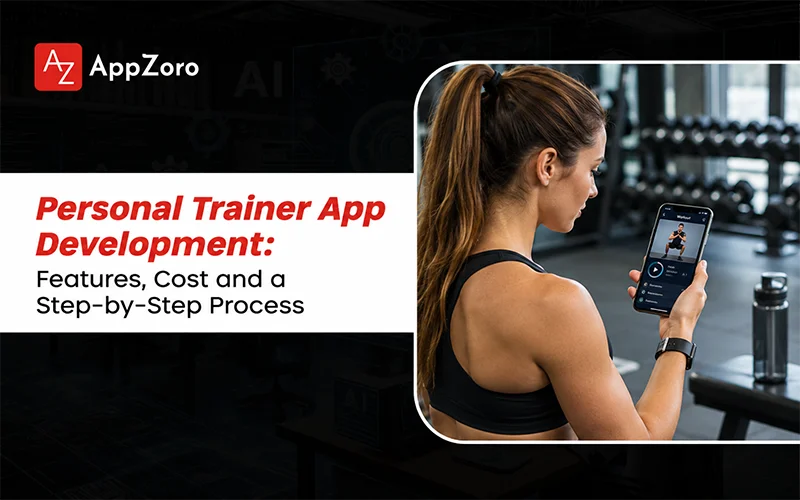
Picture a trainer named Dana. She coaches forty clients, and her system is a spreadsheet, a WhatsApp group and a payment link she copies into messages every first of the month. Programs live in Google Docs. Progress photos arrive in three different chats. On a good week it works. On a bad week she sends the wrong plan to the wrong person and spends Sunday evening apologising.Dana doesn’t need more motivation or a bigger client list. She needs the boring middle part to run itself, and you’d probably want the same: programs delivered on time, check-ins collected in one place, payments that don’t depend on her memory. That’s the real job of a personal trainer app, and it’s why so many coaches, gyms and startups ask how to build one. If you’re one of them, this guide walks you through the models, the steps, the features, the stack, the cost and the traps. AppZoro’s guide on how to develop a fitness app covers the broader fitness foundation behind all of this.
What Kind of Personal Trainer App Are You Building?
“Personal trainer app” covers four quite different products, and picking the wrong one early is the most expensive mistake in this space. The model decides your features, your audience and how you’ll earn.
| Model | How It Works | Best For | Watch Out For |
| Coach-branded app | One trainer or gym ships a white-label app for their own clients | Independent coaches, studios, gyms | Small audience, so retention matters more than acquisition |
| Trainer marketplace | Many trainers list services, users book and pay | Startups with a supply and demand plan | Two-sided cold start, trainer vetting, payouts |
| AI-led workout trainer | Software builds and adapts plans, with little or no human coach | Consumer subscriptions, scale | Plan quality, safety guardrails, user trust |
| Hybrid | AI handles daily programming, human coaches review and message | Premium coaching at lower cost per client | Complex roles and workflows |
Online personal trainer app development usually leans towards the first or last of these, because a pure marketplace needs real money for acquisition before it works. A coach-branded app can start with a single trainer and a handful of paying clients, which is a far gentler way in if you’re bootstrapping.
How to Develop a Personal Trainer App: 7 Steps
If you’re wondering how to develop a personal trainer app without burning through a budget, the order of work matters more than the speed. Here’s a sequence that holds up in practice.
- Choose the model and the audience. Beginners at home, strength athletes, postnatal clients and seniors all need very different programming and UX. Be specific, because you can’t design for everyone.
- Study the trainer’s day. Shadow a coach for a week if you can. Where does the time disappear? Programming, check-ins and billing usually top the list.
- Scope an MVP. Three to five core features on one platform. Everything else goes on a later roadmap.
- Design the experience. Workout screens get used mid-set, with sweaty hands and a phone propped against a water bottle, so you’ll want large tap targets and glanceable layouts.
- Build on a stack that fits. Cross-platform frameworks suit most coaching apps. Add native modules only where the product needs them.
- Test with real trainers and clients. A small beta shows you what no spec can: confusing flows, missing exercises, awkward billing.
- Launch, measure, iterate. Watch workout completion, weekly active clients and trainer retention, then decide what to build next.
When a team sets out to develop a personal trainer app, step three is where discipline usually slips. Everyone’s got a favourite feature, and you’ll watch the MVP quietly double in size.
Must-Have Features for a Personal Trainer App
A good personal trainer mobile app development brief splits features by who uses them. Most failed products only specified the client side, and you don’t want to repeat that.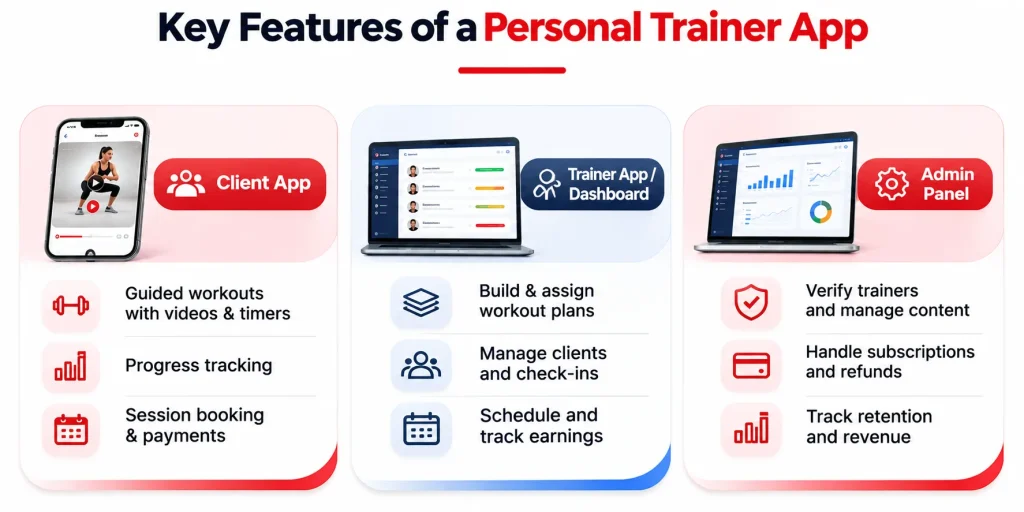 Client app
- Onboarding with goals, experience level, injuries and equipment
- Daily workout view with exercise videos, sets, reps, rest timers and notes
- Progress tracking: weight, measurements, photos, personal bests
- Chat or check-in messaging with the trainer
- Scheduling for live sessions, with reminders
- Subscription and payment management
- Push notifications for workouts, streaks and missed sessions
Trainer app or dashboard
- Client list with status, adherence and flags for anyone slipping
- Workout builder with an exercise library, templates and copy-and-adjust tools
- Program assignment at scale, so a plan can go to ten clients in a few clicks
- Check-in review, form feedback and in-app messaging
- Calendar and availability
- Earnings view, invoices and payout tracking
Admin panel
- Trainer verification and certification checks
- Content moderation and exercise library management
- Subscription, refund and dispute handling
- Analytics on retention, revenue and usage
Apps in the style of Trainerize or TrueCoach became popular largely because the trainer-side tools are strong. A client-only app can look great in a demo, but coaches won’t stick with it once the admin work gets heavier than their spreadsheet.
Features That Set a Workout Trainer App Apart
Workout trainer app development gets interesting once the basics work. A few additions tend to separate the app people keep from the one they delete after a week.
- Adaptive programming. Plans adjust to what your clients log, the sessions they skip and how hard they say it felt. This can be rules-based first, then AI-assisted as data builds up.
- Video form feedback. Clients upload a set, the trainer annotates it. Pose-detection models can offer automated cues, though accuracy varies with lighting and camera angle.
- Wearable sync. Heart rate, sleep and activity data from watches and bands make programming smarter. AppZoro’s wearable app development guide explains the architecture and trade-offs.
- Live and on-demand classes. Streaming adds cost fast, so you’ll probably leave it for phase two.
- Voice and hands-free controls. Useful mid-workout, especially for pausing, skipping and timers.
- Habit and recovery features. Nutrition logging, sleep nudges and mobility routines turn a workout app into a wellness product. AppZoro’s wellness app development guide covers that side.
- Community and streaks. Leaderboards and group challenges work for some audiences and put others off, so test before you commit.
Tech Stack for Personal Trainer Mobile App Development
The right stack depends on what your product demands, not on what’s fashionable this year.
| Layer | Common Choices | Notes |
| Mobile app | React Native or Flutter | Covers iOS and Android from one codebase for most coaching apps |
| Native modules | Swift, Kotlin | For heavy sensor, camera or watch work |
| Backend | Node.js, Python, or a managed backend such as Firebase or Supabase | Managed backends speed up MVPs |
| Database | PostgreSQL, Firestore | Relational data suits clients, programs and billing |
| Video | Cloud video hosting plus a streaming or WebRTC provider for live sessions | Bandwidth is the hidden cost |
| Payments | Stripe, with marketplace payouts if needed | Handles subscriptions and trainer splits |
| Messaging | In-app chat service or custom WebSockets | Moderation and notifications matter |
| Health data | Apple HealthKit, Google Health Connect | For wearable and phone sensor data |
| Analytics | Product analytics plus crash monitoring | Track completion and retention from day one |
Cross-platform typically trims 30% to 40% of the build cost compared with separate native apps, and your users likely won’t notice the difference in most coaching products.
How Much Does Personal Trainer App Development Cost?
Costs vary with scope more than anything else, so you’ll want to think in tiers. The numbers below follow the ranges in AppZoro’s fitness app development cost guide.
| Scope | What’s Included | Typical Cost |
| Lean MVP | One platform, 3 to 5 core features (workouts, tracking, messaging, payments) | $25,000 to $60,000 |
| Full coaching app | Both platforms, chat, scheduling, subscriptions, trainer dashboard | $80,000 to $180,000 |
| Platform or marketplace | Multi-trainer roles, payouts, live video, admin tooling, wearables | $200,000 and up |
Individual features move your number in predictable ways. Authentication and onboarding run roughly $4,000 to $10,000. Chat and community features land between $15,000 and $40,000. Live video can reach $25,000 to $80,000. Payments and subscriptions typically add $5,000 to $15,000, and each wearable integration $5,000 to $20,000.The build isn’t the whole bill, and that’s the part people forget. Year-one maintenance generally costs 15% to 25% of the original build, and cloud hosting, video bandwidth, payment processing fees and app store commissions run on top of that. If you budget only for development, you’ll usually feel it around month nine.
How Do Personal Trainer Apps Make Money?
Revenue shapes design, so decide early and don’t leave it for later.
- Client subscriptions. Monthly or annual plans for access to programs and coaching.
- Tiered coaching. A cheaper self-guided tier, a mid tier with check-ins, a premium tier with direct trainer access.
- Marketplace commission. A percentage of each booking or subscription between client and trainer.
- Trainer software fees. Coaches pay a monthly fee for the platform and brand it for their own clients.
- One-off programs and challenges. Eight-week plans or seasonal challenges sold separately.
- Corporate wellness. Employers buy seats for staff.
App store rules treat digital subscriptions and one-to-one real-world services differently, and the guidelines change. Ask your legal counsel to confirm the current payment requirements before you lock in the billing design.
Safety, Privacy and Trust
Fitness apps handle bodies, injuries and personal data, and users notice when you treat that carelessly.
- Readiness screening. A short health questionnaire at onboarding is standard good practice, with a prompt to check with a doctor when a user’s answers raise flags.
- Trainer verification. Check certifications and identity before a trainer goes live, especially if you’re running a marketplace.
- Liability and terms. Clear waivers and terms of service, drafted by a lawyer, not copied from a template.
- Data privacy. Workout logs, photos, heart rate and measurements can be sensitive. GDPR, state privacy laws and the FTC’s health breach rules may apply even when HIPAA doesn’t, so collect only what you actually need.
- Content safety. If users can share progress photos or chat, you’ll need reporting tools and moderation.
Common Mistakes in Personal Trainer App Development
- Building only for clients. The trainer’s workflow decides whether the app survives.
- Starting with a marketplace. You’d have to recruit supply and demand at the same time, and that takes budget most startups don’t have.
- Shipping a thin exercise library. Trainers leave when they can’t find the movements they program, and you won’t get them back.
- Ignoring offline use. Gym basements have terrible signal, so you’ll want workouts to load and log without it.
- Overbuilding the AI. If you’ve only got a little data, rules-based adaptation beats a half-trained model.
- Forgetting post-launch costs. Maintenance, hosting and support need their own line in your budget.
Conclusion
Dana’s spreadsheet problem is everywhere in fitness, and personal trainer app development is how you solve it properly. The strongest products start with one clear model, serve the trainer as well as the client, launch small and grow from real usage. If you remember one thing, make it that. Costs stay manageable when you keep the scope tight and plan the maintenance budget up front.If you’re ready to scope a build, AppZoro’s fitness app development and wellness app development practices can help you turn a concept into a roadmap, with realistic timelines and costs.
Frequently Asked Questions
What Is Personal Trainer App Development?
It’s the design and build of a mobile app that helps trainers deliver workouts, track client progress and handle billing, or gives users a digital trainer to follow on their own.
How to Develop a Personal Trainer App?
Choose a business model and audience, study the trainer’s workflow, scope an MVP of three to five features, design for in-workout use, build on a cross-platform stack, test with real trainers and launch.
How Much Does It Cost to Develop a Personal Trainer App?
A lean MVP typically costs $25,000 to $60,000, while a full coaching app with chat, scheduling and payments runs $80,000 to $180,000. Maintenance adds 15% to 25% of the build cost each year.
How Long Does Personal Trainer Mobile App Development Take?
An MVP usually takes three to four months, and a fuller version takes six to nine months.
What Features Does an Online Personal Trainer App Need?
Client onboarding, workout delivery with video, progress tracking, messaging, scheduling and payments, plus a trainer dashboard with a workout builder, client monitoring and billing tools.
How Is Workout Trainer App Development Different From Building a Regular Fitness App?
A workout trainer app is built around a coaching relationship, with trainer tools, check-ins and billing, while a regular fitness app mainly serves individual users tracking their own activity.
Which Technology Is Best to Develop a Personal Trainer App?
React Native or Flutter suit most coaching apps. Native Swift or Kotlin modules make sense for heavy camera, sensor or wearable work.
How Do Personal Trainer Apps Make Money?
Through client subscriptions, tiered coaching plans, marketplace commissions, trainer software fees, paid programs and corporate wellness contracts.
 Profile of Sam Agarwal