
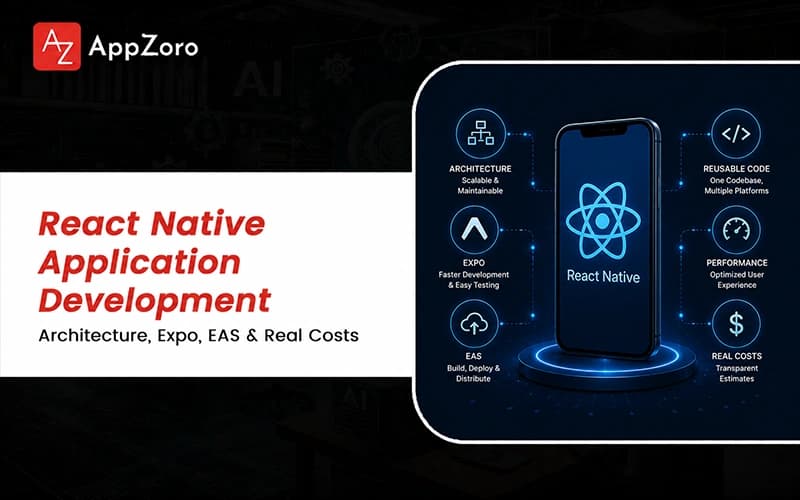
Quick Answer: React Native application development is the practice of building cross-platform mobile apps from one TypeScript codebase that compiles to genuinely native iOS and Android components. Many organizations partner with a leading mobile app development company USA to ensure their builds run on the New Architecture of Fabric, TurboModules and JSI. Realistic budgets range from around $30,000 for an MVP to well beyond $250,000 for complex products needing custom native modules.
Sit in on a mobile team's release retro in 2026 and you will hear the same quiet confession from someone on the call. The build that hurt was never the ambitious feature; it was the routine dependency bump that broke when a library abandoned the old bridge. An engineering lead named Maya once traced a brutal startup crash to exactly that, a package assuming the New Architecture her app had never adopted.
React Native application development has changed more in two years than across the five before them, yet most teams still scope the work that existed back in 2021. The framework that once felt like a clever workaround now ships genuinely native interfaces and runs a re-architected core by default. Here is the uncomfortable part: Vendor decks skip the framework choice, which rarely sinks a project and the damage comes from architecture decisions made casually in week one. Teams pick a state library out of habit, ignore the migration because everything still compiles, then spend month four untangling a problem they built in.
What follows is the conversation about React Native application development an experienced engineer would have over coffee, not the tidy pitch a shop emails after discovery. By the end, you will know what the work genuinely requires, where each shortcut breaks under real users and how senior teams ship clean.
What React Native Application Development Means in 2026 and Why the Category Looks Different
If you searched for a straight definition and bounced between "JavaScript for apps" and "the thing Facebook built," you met a category that keeps reinventing itself. React Native application development today means building mobile apps whose interface and logic live in a shared TypeScript codebase, rendered through real native components. This approach is often the centerpiece of a comprehensive custom mobile app development guide, where a tool once dismissed as a prototyping toy now powers production apps people open every day without suspecting it, closing the technical gap between cross-platform and native performance.
What changed across 2024 and 2025 was the foundation itself, the shift that reshaped the kind of mobile application development React Native grew into. A tool once dismissed as a prototyping toy now powers production apps people open every day without suspecting it.
Here is what defines the category in 2026, once you strip away the optimism of the conference stage:
A shared TypeScript codebase compiling to native iOS and Android views, with Fabric rendering and TurboModules loading native code only when something calls them.
Expo as the default starting point, paired with EAS Build for cloud compilation and EAS Update for over-the-air patches that skip the slow review queue.
A maturing library layer where React Navigation, Reanimated and Shopify's FlashList handle the heavy work that teams once hand-rolled and later quietly regretted.
What React Native Application Development Means at Its Honest Definition
At its simplest, the work means building applications where the interface and most logic live in one JavaScript codebase that renders to real native widgets. The shared-code promise is real, yet it has always sat closer to "learn once, write anywhere" than the write-once fantasy marketing oversold. Teams that internalize that distinction early budget for the platform-specific polish, separating a shipped product from a convincing demo.
Why the New Architecture Reset the Baseline
The New Architecture replaced the asynchronous bridge with JSI, letting JavaScript call native code directly instead of serializing every message into JSON across a queue. Fabric re-implemented the renderer in C++ for concurrent rendering, while TurboModules load lazily, so startup no longer pays for unused modules. Since React Native 0.76 shipped it as the default, migration moved from optional to merely a question of careful timing.
Why Expo and EAS Became the Default Path
Expo shed its prototyping-only reputation once the managed workflow learned to handle custom native modules and the core team recommended it for production. EAS Build compiles iOS binaries in the cloud, so a Windows or Linux shop ships to the App Store without maintaining a single Mac. EAS Update then delivers over-the-air fixes within minutes, closing the gap that store review queues open on every small release.
How Mobile Application Development With React Native Actually Works
If you want mobile application development with React Native to survive its first ten thousand users, the order of decisions matters more than the framework debate. The teams I have watched ship cleanly treat platform targets, architecture and native modules as deliberate week-one choices rather than deferred problems.
Some of the most-opened mobile applications developed with React Native include Shopify's merchant tools, Discord on iOS, Coinbase and large parts of Microsoft's mobile Office suite.
A realistic build runs five phases across three to seven months, following a structured mobile app development process to ensure the navigation layer, state strategy, and native modules are handled correctly. These are the critical components a standard starter template tends to omit, leading to significant hurdles when server state and local UI state stop fighting or when background work becomes inaccessible without dropping into platform-specific code:
A navigation layer, usually React Navigation or Expo Router, handling deep links, authentication gates and the back-stack behaviour users expect without ever thinking.
A state and data strategy, commonly Zustand or Redux Toolkit with TanStack Query, so that server state and local UI state stop fighting.
A native-module plan for the camera, payments, Bluetooth or background work the JavaScript layer cannot reach without dropping into Swift or Kotlin.
Why Platform Targets Are Decided Before Code
Platform targets get decided before the first screen because iOS-first and Android-first products diverge on navigation, permissions and the hardware quirks you design around. Teams pretending both platforms are identical ship an app that feels native on neither, then burn weeks retrofitting conventions they skipped. Choosing the primary platform upfront lets mobile application development React Native focus its polish budget where the core audience actually lives.
Where You Still Drop Down to Swift and Kotlin
The shared codebase covers most of an app, yet features like camera control, payments and background location still need genuine native modules. Understanding what is hybrid app development in this context means recognizing that the New Architecture exposes those modules far more cleanly than the old bridge. Budgeting for a developer who reads Swift and Kotlin comfortably decides whether those features ship or get silently cut mid-project.
The Libraries That Quietly Carry Production Apps
Production React Native application development leans on a small set of libraries that earned their place across thousands of shipped apps. React Navigation handles routing, Reanimated and Gesture Handler power smooth interaction and FlashList keeps long lists scrolling without the memory bloat of older components. Choosing boring, well-maintained dependencies over clever ones is the unglamorous discipline separating apps that age gracefully from those that rot.
Custom React Native Application Development vs Template Starters and the Real Cost
The decision between a custom build and a template starter hinges on how far your product strays from what a boilerplate already assumes. Forking a polished starter saves real time on the first sprint, yet it silently locks early architecture choices that grow expensive to unwind.
Procurement usually skips the honest cost math because vendors quote the build but omit maintenance, New Architecture upkeep, and OTA infrastructure. A detailed mobile app development cost breakdown reflects what serious teams charge once the work has been scoped honestly, showing that while a template-based MVP may land at a lower tier, a complex multi-platform product commonly passes $250,000 once the first year is counted.
These ranges reflect what serious teams charge once the work has been scoped honestly rather than optimistically on a deck:
A template-based MVP with light customization typically lands between $30,000 and $60,000, covering core screens, authentication and a single platform.
A custom build with original interface work and a handful of native modules generally runs from $70,000 to $160,000 across both platforms.
A complex multi-platform product with bespoke native work and ongoing delivery commonly passes $250,000 once the first year is counted.
Why Template Starters Inherit Hidden Limits
Template starters inherit hidden limits because every customization pulls you off the well-trodden path the boilerplate was originally tested against. Teams that fork a starter and then rework its navigation or authentication flow routinely surface edge cases the original never handled. The early speed is genuine, yet it borrows against flexibility you only miss once the product needs something unplanned.
When Custom React Native Application Development Justifies Its Premium
Custom builds justify their premium when your product needs bespoke native modules, distinctive interface work or offline behaviour a generic starter never modelled. Realizing the full strategic mobile app development benefits typically runs two to three times the cost of a template fork, yet it buys the architectural control that pays back quickly. Teams whose differentiation lives in the app experience rarely regret building custom, because a template ceiling would cap their advantage.
Why Cost Estimates Routinely Miss the Maintenance Math
Cost estimates routinely miss the maintenance math because the build quote rarely includes SDK upgrades, OS-version churn and the OTA tooling a live app needs. React Native and Expo both move quickly, so an app left on an old SDK becomes an expensive, brittle upgrade rather than a routine bump. Founders who budget fifteen to twenty percent of build cost each year for maintenance avoid the surprise that ambushes unprepared teams.
What Senior Teams Quietly Get Right About React Native Application Development
The strongest teams doing React Native application development share unglamorous disciplines that compound across every release rather than surfacing in any single demo. Businesses must know how to hire the best mobile app developer to separate the most durable mobile applications from versions that decay, specifically those who treat architecture, performance and the update path as structural commitments made early rather than fixes bolted on later.
None of these habits photograph well for a pitch deck, yet they separate the most durable mobile applications developed with React Native from impressive first versions that decay.
Here is what the senior teams consistently do differently once the deadline pressure on a project becomes real and unavoidable:
They migrate to the New Architecture early, treating it as the foundation rather than a migration to schedule once a dependency finally forces it.
They wire an over-the-air update path from day one, so the first production bug becomes a minutes-long patch rather than a multi-day review.
They set performance budgets before building, measuring startup and frame rates on mid-range Android rather than the flagship phones that developers carry.
Why They Migrate to the New Architecture Early
Senior teams migrate to the New Architecture early because retrofitting it under deadline pressure is far harder than building on it from the first commit. They treat the modern runtime as the default foundation, so every new dependency gets vetted for compatibility before it enters the project. That posture turns an industry-wide migration into a non-event; they had already handled it before it could threaten a release.
How They Plan the OTA Update Path From Day One
Planning the update path early mattered after Microsoft retired App Center and shut the CodePush service, which thousands of apps relied on in March 2025. Senior teams now standardize on EAS Update or a comparable service, scoping it during setup rather than during the first urgent hotfix. Treating over-the-air updates as core infrastructure rather than a nice-to-have keeps a small bug from becoming a week-long fire drill.
Why Performance Budgets Beat Performance Heroics
Performance budgets beat heroics because a number agreed upfront prevents the slow drift that turns a snappy launch into a sluggish app months later. Senior teams measure cold start, list scrolling and animation on the mid-range Android hardware most users own. Catching a regression the week it lands costs an afternoon, while chasing accumulated slowness across a mature codebase swallows an entire sprint.
If you have a React Native proposal on your desk and want a no-pitch second opinion on whether the scope covers native work or the New Architecture migration, our senior team reviews these almost every week. We help founders learn how to choose a mobile app development company that doesn't skip the over-the-air update path, flagging expensive gaps before you sign anything or commit to a long-term budget.
Final Thoughts
React Native application development in 2026 is a more demanding discipline than it was three years ago, yet the playbook is far more legible once you know where to look. The framework matured, the architecture settled and the tooling finally grew up, so the failure modes are now largely predictable rather than mysterious to attentive teams.
The teams that win at React Native application development are not the ones chasing the newest library or the flashiest animation reel. They prepare for common mobile app development challenges by committing to the New Architecture early, planning the update path before launch, writing native code where it earns its keep and budgeting honestly for the long-term maintenance of the product.
If the proposals on your desk feel impossible to compare fairly, find someone who has shipped real apps through real store reviews and can tell you where the scope is thin. The right partner walks you through Expo, EAS and the native-module questions without flinching, because they have lived inside enough launches to know where the work gets hard.
Leave a Comment