
DevOps for Mobile Apps: CI/CD Pipelines, Deployment Strategy and Best Practices

Friday afternoon, a mobile team prepares a release. One developer builds the iOS version on her laptop because she’s the only one with the signing certificate. Someone else builds Android, forgets to bump the version number and has to start again. Testing is a few people tapping through the app on their own phones. The build goes to the stores at 6 p.m. By Monday, a crash affecting older Android devices has hit 30,000 users, and the fix will take days to clear review.
Nothing in that story is unusual, which is exactly the problem. Manual mobile releases are slow, fragile and dependent on whoever happens to be in the office. DevOps for mobile app development replaces that with a repeatable, automated pipeline: every change built the same way, tested on real devices, signed securely and rolled out gradually so a bad release reaches a few hundred users, not everyone.
This guide explains what mobile DevOps is, how to build a mobile app CI/CD pipeline, how the deployment process works on both stores, which deployment strategies keep releases safe and how to choose your tools.
What Is Mobile DevOps?
Mobile DevOps is the set of practices, automation and culture that lets mobile teams ship high-quality app updates quickly and reliably. It borrows continuous integration and continuous delivery from web DevOps, then adapts them to constraints web teams don’t face:
| Challenge | Why Mobile Is Different |
| Store review | Every release passes through Apple and Google review before users see it |
| No instant rollback | You can’t pull back a shipped binary; you can only halt a rollout and ship a fix |
| User-controlled updates | Many users run old versions for months, so your backend must support several at once |
| Code signing | Certificates, provisioning profiles and keystores must be managed securely |
| Device fragmentation | Thousands of device and OS combinations, especially on Android |
| Two platforms | iOS and Android builds need different toolchains, often on different machines |
The payoff is real: faster releases, fewer production bugs, less dependence on individuals and a team that spends its time building features instead of babysitting builds.
The Mobile App CI/CD Pipeline, Stage by Stage
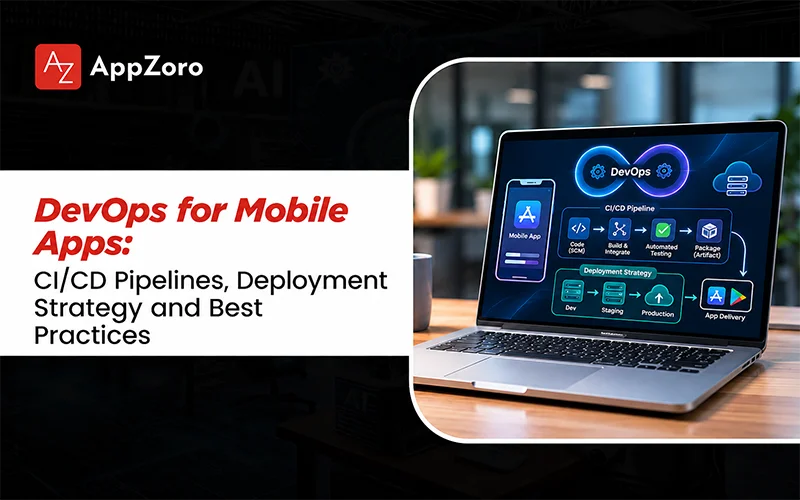
A CI/CD pipeline for mobile applications turns every code change into a tested, signed, releasable build without manual steps. A typical mobile app CI/CD pipeline looks like this:
- Commit and pull request. A developer pushes code; the pipeline starts automatically.
- Build. The pipeline compiles iOS and Android apps in clean, consistent environments. iOS builds need macOS machines.
- Static analysis and linting. Code style, common bugs and security issues are caught before anyone reviews the code.
- Unit tests. Fast tests check business logic on every change.
- UI and integration tests. Automated tests run on emulators, simulators and real devices to catch layout and flow problems.
- Versioning. Build numbers and version names are set automatically, so no release goes out with the wrong number.
- Code signing. Builds are signed with credentials stored securely in the pipeline, not on anyone’s laptop.
- Distribution to testers. Signed builds go to internal testers and beta groups through the stores’ testing programmes.
- Store submission. Approved builds, with release notes and metadata, are uploaded to the App Store and Google Play.
- Staged rollout and monitoring. The release reaches a small share of users first while crash and performance data are watched.
Continuous integration covers the first five stages and runs on every change. Continuous delivery covers the rest, so any passing build can be released at the push of a button.
The Mobile App Deployment Process
Mobile app deployment means getting a new version from your repository into users’ hands through the stores. The mobile app deployment process differs slightly by platform.
| Step | iOS (App Store) | Android (Google Play) |
| Internal testing | TestFlight internal testers | Internal testing track |
| Beta testing | TestFlight external testers, after a light beta review | Closed and open testing tracks |
| Submission | Upload build with metadata, screenshots and privacy details | Upload app bundle with store listing and data safety details |
| Review | Apple App Review, usually within a day or two | Google review, timing varies |
| Release | Manual, automatic or phased release | Full or staged rollout |
| Gradual rollout | Phased release over seven days, which can be paused | Staged rollout by percentage, which can be halted or increased |
Plan for review time in every release schedule, and keep metadata, screenshots and privacy disclosures under version control so submission is a step in the pipeline, not a scramble.
Mobile Application Deployment Strategies
Because you can’t recall a mobile release, your mobile application deployment strategy has to limit the blast radius of any mistake.
| Strategy | How It Works | Why It Helps |
| Phased or staged rollout | Release to a small share of users, then widen | Problems reach a few users, not all of them |
| Feature flags | Ship code switched off, then turn features on remotely | Decouples deployment from release; bad features can be switched off instantly |
| Remote configuration | Change settings, text or behaviour from the server | Fix some issues without a new build |
| Beta programmes | Early users try builds before public release | Real-world feedback before the stores |
| Backward-compatible APIs | Backend supports several app versions at once | Users on old versions keep working |
| Minimum version enforcement | Prompt or require updates below a set version | Retire insecure or broken versions |
| Blue-green backend deployments | Run old and new backend side by side and switch traffic | Instant rollback on the server side |
The most mature teams combine all of these: every feature behind a flag, every release staged, every API versioned and every rollout watched in real time.
Automated Mobile App Deployment: What to Automate
Automated mobile app deployment removes the manual steps where most release mistakes happen. Start with these:
- Builds for every pull request and every merge to the main branch.
- Version and build numbers, generated automatically.
- Code signing, with certificates and keystores held in the pipeline’s secure storage.
- Tests, from unit tests to UI tests on devices.
- Tester distribution, so every approved build reaches beta testers without anyone uploading it.
- Store metadata, including release notes, screenshots and privacy details, kept in the repository.
- Store submission and the start of a staged rollout.
- Notifications to the team when a build fails, a rollout starts or crash rates rise.
Automate the riskiest and most repetitive steps first, usually signing and submission, then expand.
Choosing the Best CI/CD for Mobile Apps
There’s no single best CI/CD for mobile apps; there’s the best fit for your team. Most options fall into three groups.
| Option | What It Is | Best For | Trade-off |
| CI built into your code platform | The CI/CD service that comes with your code repository | Teams already using that platform who want everything in one place | Needs more setup for signing and macOS builds |
| Mobile-specialised CI/CD services | Hosted services built around iOS and Android workflows | Teams that want signing, device testing and store uploads ready to go | Higher cost per build minute |
| Self-hosted CI with build automation tools | Your own build servers running open-source automation scripts | Large teams needing full control or strict security | You maintain the machines, including Macs |
Whatever you choose, check it against these criteria for CI/CD for mobile app development:
- Builds both iOS and Android, with reliable macOS machines for iOS.
- Handles code signing securely and simply.
- Supports testing on emulators, simulators and real devices.
- Uploads to TestFlight and Google Play testing tracks automatically.
- Supports caching to keep build times down.
- Works with your stack, whether native, Flutter or React Native.
- Has clear, predictable pricing as build volume grows.
Testing in a Mobile DevOps Pipeline
Follow the testing pyramid: many fast unit tests, fewer integration tests and a focused set of UI tests on the journeys that matter most, such as sign-up, checkout or booking. Run UI tests across a representative device matrix: the most common devices among your users, the oldest OS version you support and the newest beta. Real-device testing catches problems emulators miss, especially with cameras, Bluetooth, notifications and performance on low-end phones.
Security in the Pipeline
- Store signing certificates, keystores and API keys in the pipeline’s secrets manager, never in the repository.
- Restrict who can trigger production releases.
- Scan dependencies for known vulnerabilities on every build.
- Run static security analysis on code.
- Keep an audit trail of who released what and when.
Monitoring and Feedback
Deployment isn’t the end of the pipeline. Track crash-free sessions, app start time, API errors and key journey completion for each release. Set alerts that pause a staged rollout automatically if crash rates climb, and feed what you learn back into the next sprint.
Mobile DevOps Best Practices
- Make the main branch always releasable. Small, frequent merges beat long-lived branches.
- Automate signing from day one. Signing on someone’s laptop is a single point of failure.
- Release on a regular cadence. Weekly or fortnightly releases make each one smaller and safer.
- Put new features behind flags. Ship code early; release features when they’re ready.
- Always use staged rollouts. There’s rarely a good reason to release to everyone at once.
- Version your APIs. Old app versions will be around for months.
- Keep build times short. Caching and parallel jobs keep developers from waiting.
- Watch every release. Decide in advance what crash rate halts a rollout.
Common Mistakes
- Manual releases dependent on one person. Holidays and resignations stop shipping.
- Testing only on emulators. Real devices behave differently.
- Releasing to 100% of users immediately. One bug becomes everyone’s bug.
- Ignoring old app versions. Backend changes break users who haven’t updated.
- Secrets in source code. Leaked keys are a security incident waiting to happen.
- Slow, flaky pipelines. If builds take an hour and fail randomly, people stop trusting them.
Conclusion
DevOps for mobile apps turns releases from a stressful Friday ritual into a routine. Automate the build, test, sign and submit steps, roll out in stages, put features behind flags and watch every release closely. The result is faster updates, fewer bad surprises and a team that ships with confidence.
If your mobile releases still depend on manual steps, AppZoro’s DevOps and cloud architecture team can design and set up a mobile app CI/CD pipeline that fits your stack, alongside our mobile app development services.
Frequently Asked Questions
What is DevOps for mobile apps?
It's the practice of automating how mobile apps are built, tested, released and monitored, adapted to app store review, code signing and device fragmentation.
What is a CI/CD pipeline for mobile applications?
An automated workflow that builds, tests, signs and distributes iOS and Android apps on every code change, then submits approved builds to the app stores.
What is the mobile app deployment process?
Internal testing, beta testing, store submission with metadata, store review and release, usually through a phased or staged rollout.
What is the best mobile application deployment strategy?
Combine staged rollouts, feature flags, remote configuration and backward-compatible APIs, and monitor each release closely.
What is the best CI/CD for mobile apps?
It depends on your team. CI built into your code platform suits teams wanting one toolset, mobile-specialised services suit teams wanting ready-made signing and device testing, and self-hosted pipelines suit teams needing full control.
How is mobile DevOps different from web DevOps?
Mobile releases pass through store review, can't be rolled back instantly, run on thousands of devices and depend on users choosing to update.
 Profile of Sam Agarwal